 Spell Beasts
Teacher sign in
Spell Beasts
Teacher sign in
Spell Beasts for Schools
Set the words. See who’s learned them.
Spell Beasts for Schools gives your teachers a simple app to set this week’s spellings, follow every child’s practice at school and at home, and run the Friday test on any device. Children join with a code: no accounts and no email addresses.
a month for the whole school, with unlimited pupils. Always free for families.
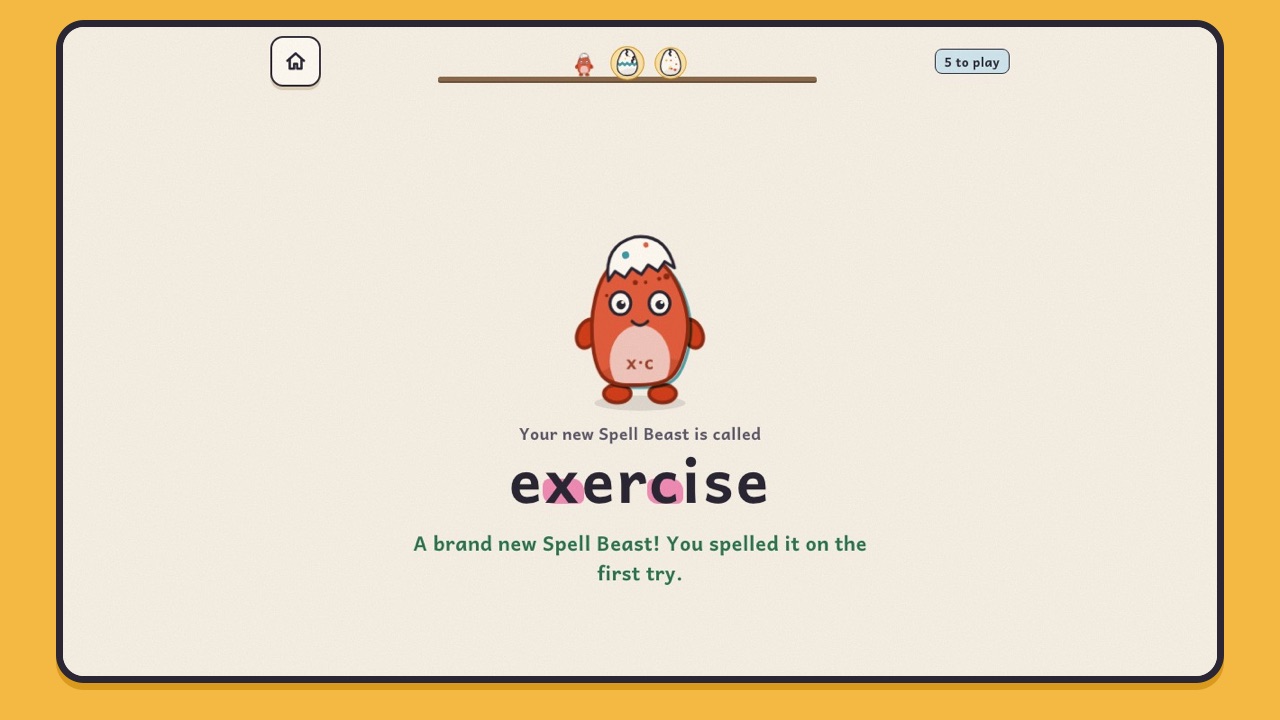
A spelling week with Spell Beasts
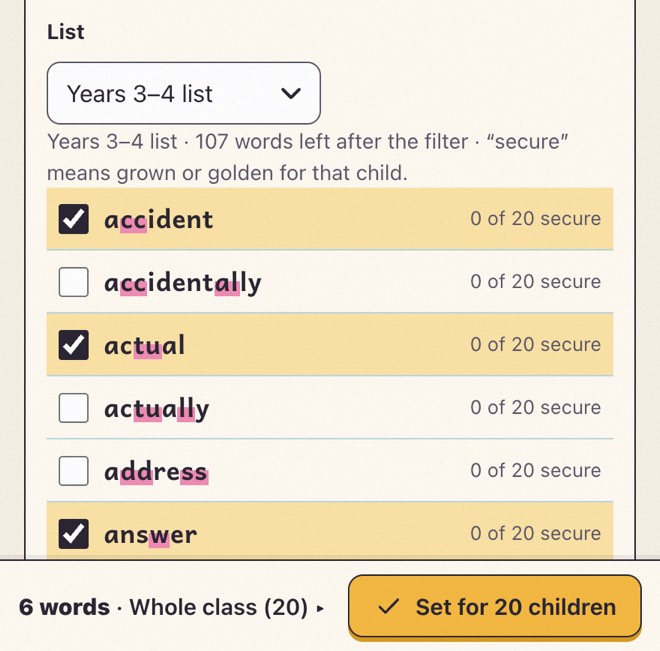 MondaySet the words. Choose a statutory list, one of 90 spelling-pattern lists, or type your own. Different groups can have different words.
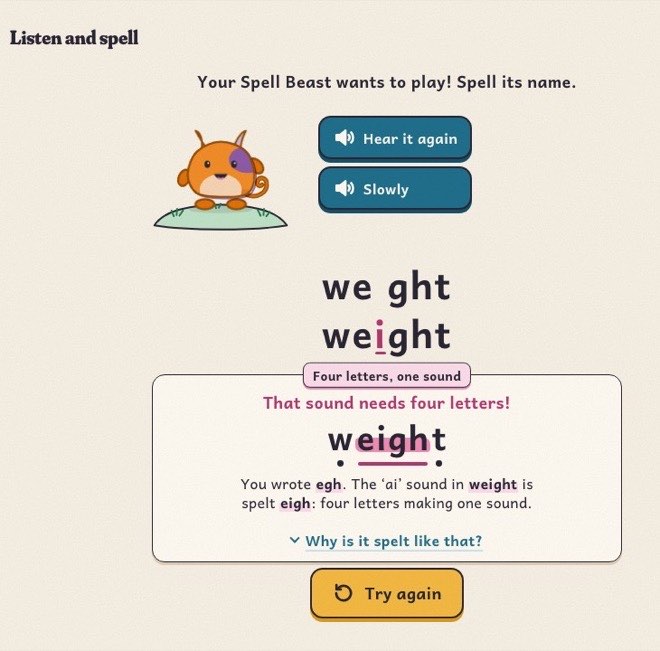 Monday to ThursdayPractise. About seven minutes a day, in class or at home, on any device. Practice counts wherever it happens.
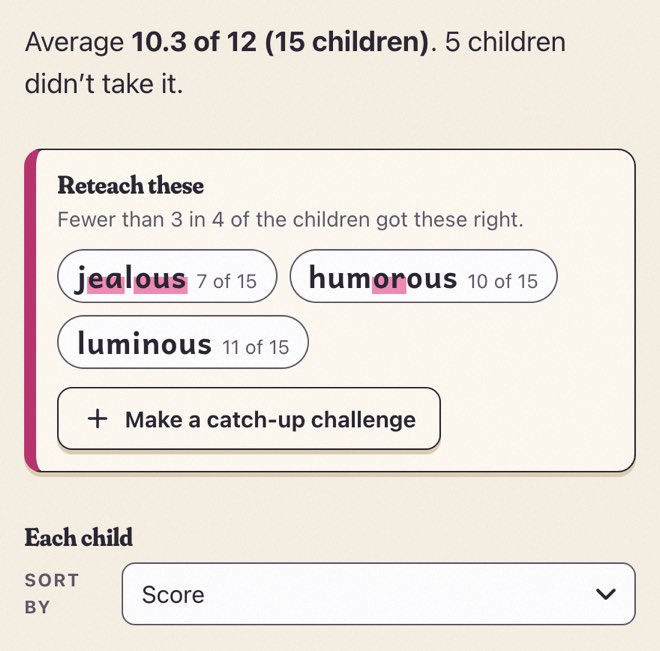 FridayTest. Read the words aloud, or let each device read them. Answers arrive as children type, and the results appear when you close the test.
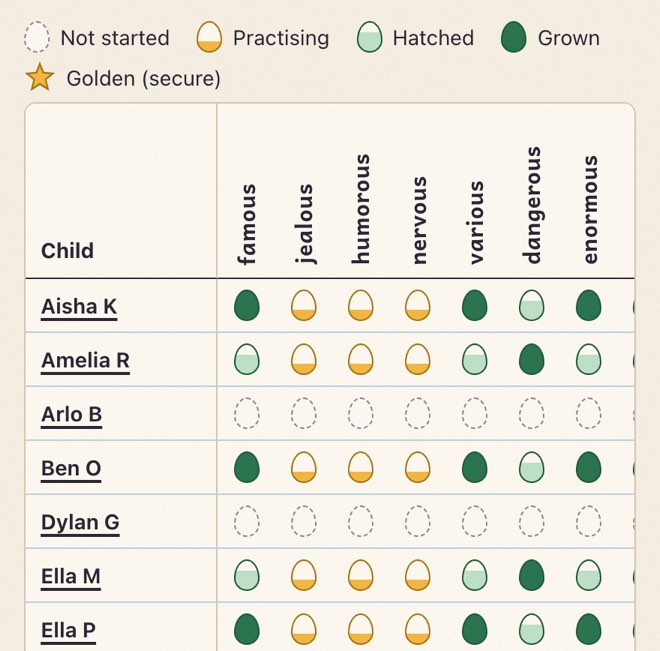 Any daySee what’s sticking. Progress for every child and word, the most-missed spellings with what children actually wrote, and plain-English pointers on what to teach next.
Pictures from the teacher app and the children’s app, with made-up children.
Every statutory word, ready to go
Spell Beasts follows English Appendix 1 of the national curriculum in England. Every built-in word comes with its spelling chunks, its tricky bit, a tip for remembering it, a child-friendly meaning and a sentence, and is read aloud.
- 50Year 1 common exception words and the days of the week
- 64Year 2 common exception words
- 109Years 3 and 4 statutory word list
- 104Years 5 and 6 statutory word list
- 90ready-made lists, one for each spelling pattern in the appendix, by year group
Everything in Spell Beasts for Schools
Every school gets every feature. Here is all of it, by who uses it.
For children
- Meet it, practise it, hatch it, grow it. Each word is an egg. Children meet it (hear it, see it in chunks, find its tricky bit), practise it in short games that take the help away step by step, then spell it from memory to hatch a Spell Beast made from the word’s own letters. It comes back after 1, 3, 7, 14 and 30 days; remember it each time and it grows up, then turns golden.
- Short sessions. About seven minutes: a few new words, plus reviews of words learned before.
- Learning activities. Meet the word; Fade Out, where letters fly off one by one; Stepping Stones, where the egg crosses a river one chunk at a time; Wing Cover (look, say, cover, write, check); Listen and spell; and Teach the Spell Beast, where children find the slip in a muddled word.
- Games with their own words. Spell Song, Constellation, the Arcade (Letter Dash, Sky Post, Letter Snake and Spell Racer) and Hyperspell.
- Feedback that teaches. When a word isn’t right yet, children see which letters to look at and why the word is spelt that way, get one strategy, and try again. After three goes they copy it letter by letter, so every attempt ends on a correct spelling. No red crosses, no buzzers, no lives.
- Their class on the home screen. Words from their teacher come first, a class beast grows as the whole class learns words, and a banner appears when a test is open.
- The Beast Book and Test day. Every word’s Spell Beast, sorted by habitat; and a practice spelling test of up to 20 words that ends with a parade.
- Made for classrooms. Every activity works with the sound off. Several children can share one iPad, each with their own nest. It works offline once opened, and practice syncs when the connection comes back.
- Accessible. Words are set in Andika, with single-storey a and g and clearly different b, d, p and q. Easier-reading spacing, cream, blue, green or rose page tints, less movement, an ABC keyboard and fewer words per session. Full keyboard and screen-reader support, designed to meet WCAG 2.2 AA.
- Never against the clock. Daily sessions and spelling tests are never timed. The one clock is the Arcade’s optional Turbo speed, where a child can try to beat their own best time.
For teachers
- Classes and groups. Make a class for each group you teach, or split a class into up to eight groups so children get different words.
- Pupils in a minute. Paste a list of first names. Each child gets a secret beast picture at once, printed on their login card with the class code and a QR code, eight or ten cards to an A4 page.
- Sign-in that suits your class. Children tap their name or type it, with or without their secret beast, or each child has a pupil code that signs them straight in, which suits younger children and home. Change it any time. Reset a child’s beast, sign a lost device out, or switch joining off once everyone is in.
- Challenges. Set words with dates for the whole class, some groups or particular children, with an optional goal (hatch every word, grow every word, minutes of practice or a test score) and a note from you. Children can have more than one at a time, and you can copy a challenge to another class.
- Your own words, checked by you. Use the statutory lists, the pattern lists or your own words, up to 30 a challenge. For a topic word Spell Beasts doesn’t have yet, such as “volcano”, our AI helper drafts a meaning, a sentence, a tip and the tricky bit. You read it, edit it if you like and approve it; only then is it recorded in Lily’s voice (the voice that reads every word in Spell Beasts) and shown to children. Your school can add up to new words a month; built-in words, and words your school has already approved, never count.
- Progress without marking. A grid of every child and word, from egg to golden; the most-missed words with what children actually wrote; what the class finds tricky, by spelling pattern; statutory coverage for each child and the class; minutes practised in school and at home.
- Insights. Short, plain-English pointers worked out by fixed rules, not AI, each with the numbers behind it. For example: “8 children wrote freind”, “Split digraphs are the class’s biggest theme” or “5 children haven’t practised Week 6 yet”. Depending on the insight, you can set a catch-up challenge for just those children, show the words on the whiteboard with their sound buttons, print practice sheets, or give families a reminder. A Monday email with three things to look at is there if you want it, with no children’s names in it.
- Challenge reports. For each challenge: how many finished, accuracy, time spent and the test average; a sortable table of every child; accuracy and misspellings for each word; and when children practise, in school and at home. Export it as a spreadsheet.
- Class tests on devices. Read the words yourself, or let each device say the word and a sentence in Lily’s voice. Answers arrive live; results by child and by word appear when you close the test, ready to print.
- Invite families. A ready-made message with your class link, code and QR code to paste into ParentMail, Arbor, Class Dojo, Seesaw or your school email, and letters to print: one for the class, or one for each child’s book bag. Spell Beasts never contacts families itself.
- Print. Login cards, family letters, a challenge’s word list, test results and Look, Say, Cover, Write, Check sheets; plus, in the free app’s Grown-ups area, test sheets with a script to read aloud, word mats and certificates.
- Export and tidy up. Download a class’s progress as a spreadsheet. Remove a child and their data at once. Archive a class at the end of the year.
For School Admins
- Staff accounts. Add colleagues with a name and school email address, as a School Admin or a Teacher, and choose the classes they teach. They sign in with an emailed link or code: no passwords.
- Changes and leavers. Change a role, deactivate an account, and hand someone’s classes to a colleague in one step. Your school always keeps at least one School Admin.
- The whole school in view. Every class, and each colleague’s classes, last sign-in and a record of what they have done.
- The whole school this week. Every class side by side, by year and key stage: who has practised, time, accuracy, statutory coverage and what needs a look. Export a summary for governors, printable or as a spreadsheet, with no children’s names.
- Year groups. One year code per year group: children choose their class, then carry on as usual. The year-group page puts the classes side by side, with the most-missed words, what the year finds tricky and statutory coverage across the year. Set the same words for every class in a year at once.
- School settings. Mark your school holidays so practice at home is counted properly, see your plan and trial dates, and find a short summary of what is kept about children.
- Deleting a class. Only School Admins can delete a class and all its data. Teachers can archive their own.
For families
- Nothing to sign up for. Families never have accounts, and Spell Beasts holds no way to contact them. Everything comes from the school, through the channels it already uses.
- One code, any device. The code or QR code on the letter signs a child in at home. Practice at home goes to the same record as practice in school, and shows in your progress as minutes at home.
- Free for everyone. Families can also use the free app on their own, with nothing to sign up for.
Safeguarding
Built so that nothing unsuitable reaches a child, and children can’t reach each other.
- No contact between children. No chat, no messages, nothing to publish, and no child sees another’s progress. The class beast shows only a class total. No leaderboards, adverts or purchases.
- An unsuitable-word filter everywhere. One shared filter checks custom words, everything the AI writes, pupil names, class, group and challenge names, notes to children, and word lists in the free app. It sees through swapped letters, symbols and spacing. If a child types something that looks like an unsuitable word, it is never stored or shown: the teacher sees only that an attempt was hidden.
- A teacher reads every AI-written word first. Nothing the AI writes reaches a child until a teacher at your school has read and approved it, and an AI draft with anything doubtful in it can’t be approved at all. The AI only ever receives the word.
- Children can’t sign in as each other. Secret beasts are given by the teacher, not chosen, so nobody with a class code can claim a child who hasn’t joined yet. Three wrong beasts lock that child for ten minutes. A class code never shows the school’s name; typed-name sign-in hides the class list; and a code can be switched off or replaced at once.
- We don’t look at your pupils. Our own admin tools show counts, never children’s names or results.
Data protection
A first name and practice data, stored in the EU, deleted when you delete it, and never seen by AI.
- You are in control.Your school is the data controller; we are the processor and act only on your instructions. We offer a data processing agreement, or can sign your school’s, trust’s or local authority’s own where it fits.
- The minimum about children.The name a teacher types (a first name and an initial is enough), their class and group, a secret beast picture, and their practice: words tried, right or wrong, what they wrote when it was wrong, how long answers took, minutes practised, class test answers, and when they signed in and practised.
- Never collected.Surnames (unless a teacher types one), dates of birth, gender, email addresses, photos, voice recordings, special educational needs, unique pupil numbers, locations, device identifiers, or anything about parents.
- About staff.Email address, name, role and classes, sign-in times and a record of significant actions. No passwords and no phone numbers.
- Stored in the EU.Our database is created in Cloudflare’s EU jurisdiction and encrypted at rest (AES-256) and in transit. Resend sends emails to teachers from Ireland and keeps a log of them for 30 days in the United States; none of them includes pupils’ names.
- AI and the voice never see children.Our AI helper (Claude, by Anthropic) and our voice service (ElevenLabs) receive only spelling words and example sentences, never anything about a school, a teacher or a child. Children’s devices never contact either.
- Deleting is real.Removing a child, or deleting a class, takes effect at once. Archived classes go after 30 days, and a class nobody has used for 13 months is deleted automatically, after a warning email. If you leave, your school’s data is deleted within 60 days, after you have had the chance to export it.
- Secure by design.Staff sign in with a single-use link or code, so there are no passwords to steal. Sign-in secrets are stored only in scrambled form. Every request is limited to your own school. Rate limits stop guessing, and our logs never contain pupils’ names.
- Rights requests without waiting for us.Teachers can see, export, correct or delete a child’s data in the app. For a complete copy of everything about one child, we reply within five working days.
- If something goes wrong.We tell your school within 24 hours of becoming aware of a breach affecting your data, with what we know and what we recommend.
- The Children’s Code.Designed to the standards of the ICO’s Age Appropriate Design Code, as well as UK GDPR and the Data Protection Act 2018.
For our full data protection statement and data processing agreement, email .
Ask us for our full data protection statement and data processing agreement when you request a trial.
The free app and Spell Beasts for Schools
The free app stays free for everyone. Spell Beasts for Schools adds a teacher app and progress that follows each child.
| Feature | The free app | Spell Beasts for Schools |
|---|---|---|
| Every statutory word and spelling-pattern list | Yes | Yes |
| All the games, the Beast Book and Test day | Yes | Yes |
| Make your own lists and share them by link or QR code | Yes | Yes, as challenges for classes, groups or children |
| Printable sheets | Yes | Yes, plus login cards and family letters |
| Topic words of your own | Shown on screen | Drafted by AI, approved by a teacher, read aloud in Lily’s voice |
| Progress | On each device | For teachers, the same on every device, at school and at home |
| Class spelling test | Each child gets a result code at the end; you type the codes in to see the class’s results | On devices, with live results |
| Insights, challenge reports, year groups | No | Yes |
| Accounts | None | For school staff only |
| Personal data | None leaves the device | A first name and practice data, stored in the EU |
| Price | Free | a month for the whole school, with unlimited pupils |
Prices
One simple price for every school, with unlimited pupils and teachers. Every school gets every feature.
- What’s included: every feature on this page, for all your teachers and classes, with up to new topic words a month.
- Paying: invoiced once a year () against a purchase order.
- Free trial: days, with no card details and nothing charged automatically.
- Families: always free.
Spell Beasts for Schools
a month
For the whole school, with unlimited pupils and teachers.
Invoiced once a year: .
Try it free for days
- Request a trial.
Tell us your name, school email address, school and role. We don’t need anything about the children.
- We set up your school.
A real person at Spell Beasts reads every request and sets up your trial. You get an email inviting you to be your school’s School Admin.
- Add your colleagues and classes.
Invite your teachers, paste your pupils’ first names and print their login cards. Children join on any device with a code.
Nothing is charged automatically. To carry on, tell us and we’ll send an invoice. If you stop, we delete your school’s data within 60 days, after you have had the chance to export it.
Questions
For head teachers
What does it cost?
a month for the whole school, however many pupils you have, invoiced once a year (). That covers every feature, for all your teachers and classes.
Does it replace our spelling scheme?
No. Spell Beasts is practice. Use it alongside the scheme you already teach, with your own weekly words or the ready-made pattern lists.
What does it ask of teachers?
Choosing the week’s words: a ready-made list, or the words you already have, pasted in. There is nothing to mark. Progress fills in as children practise, and test results appear when the teacher closes the test.
Is it safe for children?
Children can’t contact each other or see each other’s progress, and there are no adverts or purchases. A filter checks every name and word for anything unsuitable, and nothing the AI writes reaches a child until one of your teachers has approved it.
What is the learning behind it?
A few well-tested ideas about how spellings stick: spelling from memory rather than copying (retrieval practice), coming back to each word after 1, 3, 7, 14 and 30 days (spaced practice), saying a word the way it is spelt, picking out the tricky bit, and ending every attempt on a correct spelling.
What do we need?
Devices with a recent web browser: iPads, Chromebooks, Android tablets or computers. Before your trial, ask whoever runs your web filter to allow our address. Children’s devices only ever contact that one address.
For English leads
Which words are included?
All four statutory lists (Year 1 and Year 2 common exception words, and the Years 3 and 4 and Years 5 and 6 word lists) and 90 ready-made lists, one for each spelling pattern in English Appendix 1. You can add any words of your own.
Can different groups have different words?
Yes. Split a class into groups, or aim a challenge at particular children. A child can have their class’s weekly words and a group challenge at the same time.
Can we add topic words?
Yes. Type a word Spell Beasts doesn’t have, and our AI helper drafts a meaning, a sentence, a tip and the tricky bit. You check it, change it if you like and approve it; then it is read aloud like every other word. Your school can add up to new words a month.
How do I see what the class finds tricky?
Each challenge’s Words tab shows the most-missed words with what children actually wrote, and groups mistakes by spelling pattern. Insights point out patterns such as a shared misspelling or a homophone mix-up, and the Teach it page puts those words on your whiteboard with their sound buttons.
Can we use it for the Friday test?
Yes. Read the words yourself while children type on their devices, or let each device read them. Results by child and by word appear when you close the test, ready to print.
Will it help with a subject deep dive?
It shows which statutory words each child, class and year group has secured, is still practising or hasn’t started, and you can export progress as a spreadsheet.
What about children with SEND or dyslexia?
Words are set in Andika, a typeface designed for literacy. Grown-ups can switch on easier-reading spacing, a page tint, less movement and fewer words per session. Daily sessions and spelling tests are never timed, and every activity works with the sound off.
Does practice at home count?
Yes. With the code from school, practice at home goes to the same record as practice in class, and your progress shows minutes at home and in school separately.
For school business managers and data protection officers
How do we pay?
Once a year, on invoice against a purchase order: , which is a month. There are no card payments and no automatic renewals.
Is there a data processing agreement?
Yes. We offer one covering everything UK GDPR Article 28 requires, or can sign your school’s, trust’s or local authority’s own where it fits.
What personal data do you hold?
For staff: email address, name, role and classes, sign-in times and a record of significant actions. For children: the name the teacher types, their class, a secret beast picture and their practice. Nothing about parents. Our privacy notice has the detail.
Where is it stored, and who else is involved?
In the EU, with Cloudflare. Resend sends emails to teachers from Ireland and keeps a log of them for 30 days in the United States; none of them includes pupils’ names. Anthropic and ElevenLabs receive only spelling words and sentences, never personal data. We tell schools before adding or replacing a provider.
Do you connect to our MIS or Wonde?
Not yet. Teachers paste their pupils’ first names, and staff sign in with an emailed link or code. Google and Microsoft sign-in aren’t available yet either.
Does it use cookies?
One, for staff only, to keep them signed in. The children’s app sets no cookies, and there are no analytics, adverts or trackers anywhere.
What happens to our data if we leave?
You can export it first. Your school, its staff accounts and all its data are then deleted within 60 days, or sooner if you ask.
Have you done a DPIA?
We give you what your own DPIA needs: our data protection statement and data processing agreement. For copies, email .Ask us for them when you request a trial.
Is there an accessibility statement?
Yes: our accessibility statement. Spell Beasts is designed to meet WCAG 2.2 at level AA.
Try it with your classes
days free. We set your school up; you add your colleagues and classes.